Table of Contents
- Why a Well‑Written Business Email Still Matters
- Core Components of a Professional Business Email
- 1. Subject Line – The First Hook
- 2. Greeting – Set the Tone
- 3. Opening Sentence – Capture Immediate Interest
- 4. Body – Structured and Concise
- 5. Call‑to‑Action (CTA) – Clear Next Steps
- 6. Closing – Polite and Professional
- 7. Attachments and Links – Reference Them Clearly
- Step‑by‑Step Example: How to Write a Professional Business Email
- Advanced Tips for Elevating Your Business Emails
- Personalize Without Overdoing It
- Mind the Timing
- Use Templates Wisely
- Proofread, Then Proofread Again
- Leverage Email Analytics
- Maintain a Consistent Brand Voice
- Common Mistakes and How to Avoid Them
- Overloading the Email with Information
- Vague Calls‑to‑Action
- Neglecting the Recipient’s Perspective
- Forgetting Attachments
- Using Inconsistent Formatting
- Putting It All Together: Your Email Checklist
In today’s fast‑paced corporate environment, the ability to craft a polished business email can be the difference between securing a deal, maintaining a partnership, or being ignored altogether. Whether you’re reaching out to a new client, following up on a proposal, or simply confirming a meeting, the structure, tone, and details of your message matter as much as the content itself. This guide walks you through every element of a professional business email, from the subject line to the signature, and even provides a fully formatted example you can adapt on the spot.
Most professionals assume that email etiquette is intuitive, but subtle missteps—like an ambiguous greeting, a cluttered body, or a missing call‑to‑action—can erode credibility. By treating each email as a mini‑business proposal, you ensure that the recipient sees you as organized, respectful, and results‑focused. Below, we’ll unpack the anatomy of a perfect email, share proven strategies for each section, and then present a complete “how to write a professional business email example” that you can copy‑paste and customize.
Why a Well‑Written Business Email Still Matters
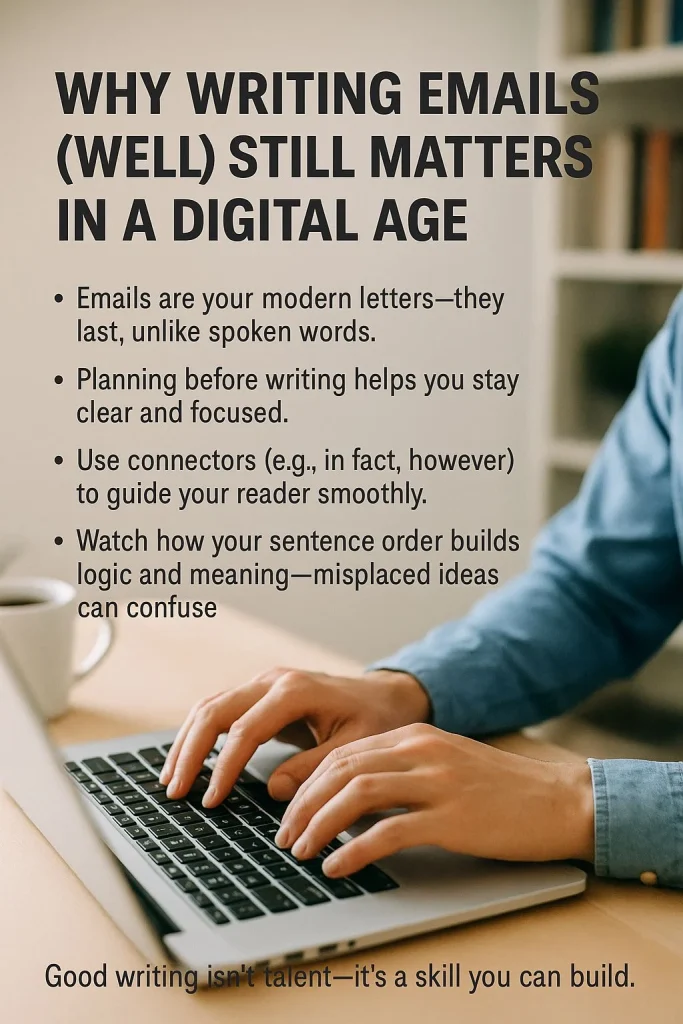
Even with the rise of instant messaging and collaborative platforms, email remains the backbone of formal communication in most organizations. It provides a permanent record, allows for thoughtful composition, and reaches anyone with an internet connection. A well‑crafted email does three things simultaneously:
- Establishes credibility: Proper grammar, concise language, and a logical flow signal professionalism.
- Facilitates action: Clear requests and deadlines make it easy for the reader to respond appropriately.
- Preserves relationships: Polite tone and thoughtful phrasing help maintain goodwill, even when delivering difficult news.
For instance, when you need to apologize to a dissatisfied client, using the right template can turn a negative experience into a loyalty‑building moment. Check out The Ultimate Apology Email Template to U.S. Customers for a concrete example of turning a complaint into a future opportunity.
Core Components of a Professional Business Email
1. Subject Line – The First Hook
The subject line is the gatekeeper of your email. A compelling, concise subject tells the reader why the email matters and encourages them to open it. Follow these guidelines:
- Keep it under 60 characters: Many mobile clients truncate longer subjects.
- Use action verbs: Words like “Confirm,” “Request,” “Update,” or “Invite” convey purpose.
- Personalize when possible: Including the recipient’s name or a project reference boosts open rates.
Example: “John, Confirmation Needed: Q3 Marketing Budget Review – 10 AM Tomorrow”
2. Greeting – Set the Tone
A proper greeting signals respect and establishes the level of formality. When you know the recipient’s name, use “Dear [First Name]” or “Hello [First Name]”. If you’re addressing a group, “Dear Team” works well. Avoid overly casual salutations like “Hey” in a business context unless you have an established informal rapport.
3. Opening Sentence – Capture Immediate Interest
Begin with a brief sentence that states the purpose of the email. This helps the reader quickly understand why they should keep reading. If you’re replying to a previous conversation, reference it directly:
“Thank you for sharing the draft proposal; I have a few suggestions that could strengthen our positioning.”
4. Body – Structured and Concise
The body should be broken into short paragraphs, each covering a single idea. Use bullet points or numbered lists when presenting multiple items, as they improve readability. Keep sentences under 20 words where possible, and avoid jargon unless you’re certain the recipient is familiar with it.
When you need to convey data or deadlines, a table or a bolded line can draw attention. For example:
- Deadline: Friday, 12 May, 5 PM
- Required documents: Project charter, risk assessment, and budget forecast
5. Call‑to‑Action (CTA) – Clear Next Steps
Every professional email should end its main content with a specific CTA. Whether you need a confirmation, a signed contract, or feedback, phrase the request clearly and provide any necessary instructions.
Example: “Please review the attached timeline and reply with your approval by Wednesday, 9 AM, so we can proceed with vendor selection.”
6. Closing – Polite and Professional
Common closings include “Best regards,” “Sincerely,” or “Thank you.” Choose one that matches the overall tone of the email. Follow the closing with a blank line, then your full name, title, company, and contact information. Adding a small email signature with a logo or social links can enhance brand consistency.
7. Attachments and Links – Reference Them Clearly
If you attach files, mention them in the body so the reader knows what to expect. For example: “I’ve attached the revised contract (PDF, 2 pages) for your review.” When linking to external resources, ensure the anchor text is descriptive, not just “click here.”
Speaking of links, you might also need to guide readers to related content. For instance, when discussing a supplier decision, you could reference The Ultimate Guide to a Supplier Rejection Email for best practices on handling delicate rejections.
Step‑by‑Step Example: How to Write a Professional Business Email
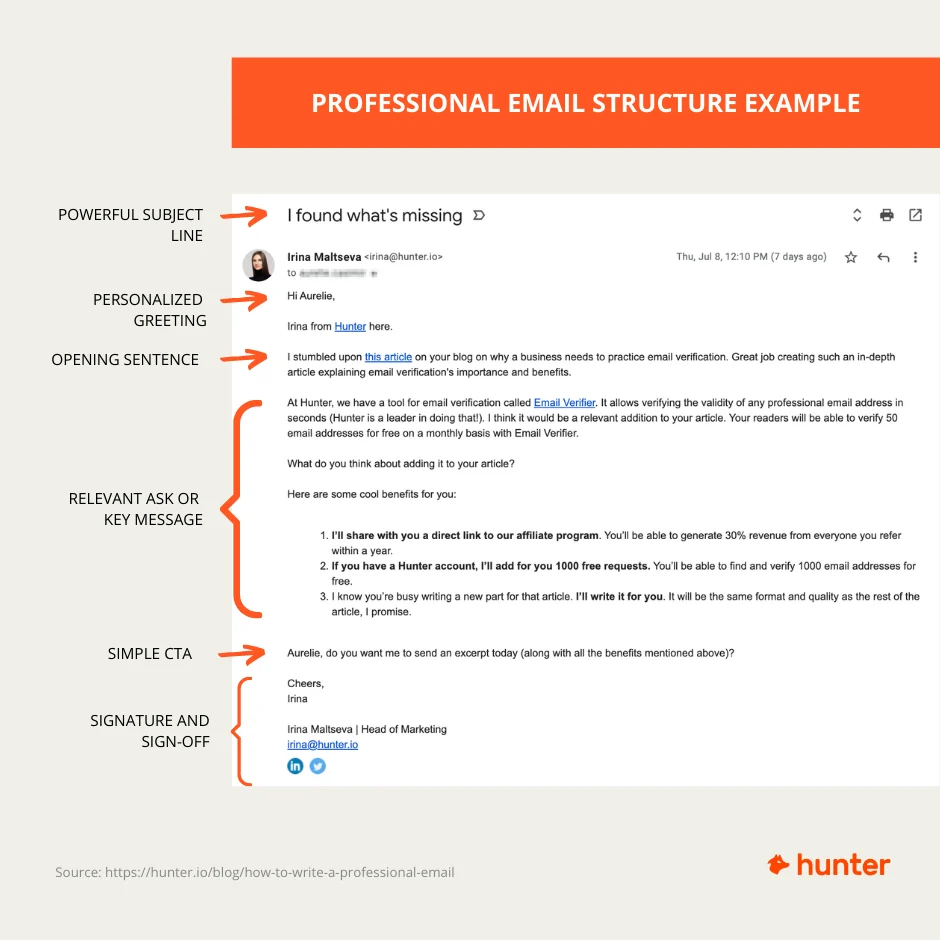
Below is a fully fleshed‑out email that incorporates every element discussed. Feel free to copy it into your email client and replace the placeholders with your own details.
Subject: Request for Approval – Q2 Project Timeline (Due 5 May)
Dear Maria,
I hope you’re well. Following our meeting on April 28, I have finalized the project timeline for the Q2 product launch and need your approval to move forward with the implementation phase.
**Key Milestones**
- **Research & Development:** 6 May – 20 May
- **Beta Testing:** 22 May – 5 June
- **Marketing Campaign Roll‑out:** 10 June – 30 June
- **Full Launch:** 15 July
Please review the attached timeline (PDF, 3 pages). If the dates align with your expectations, kindly reply with your approval by **5 May, 12 PM**. Should you have any concerns or need adjustments, let me know and I’ll be happy to revise accordingly.
Thank you for your continued support. I look forward to your feedback.
Best regards,
Alex Turner
Senior Project Manager
InnovateTech Solutions
Phone: +1 (555) 123‑4567
Email: [email protected] www.innovatech.com
Notice how the email:
- Uses a concise, action‑oriented subject line.
- Begins with a polite greeting and a brief purpose statement.
- Organizes information with bold headings and bullet points.
- Ends with a crystal‑clear CTA and a professional sign‑off.
Advanced Tips for Elevating Your Business Emails

Personalize Without Overdoing It
Reference a recent interaction, a mutual connection, or a specific detail that shows you’ve done your homework. This creates a sense of relevance and can increase response rates. However, avoid excessive flattery; keep it sincere and brief.
Mind the Timing
Sending emails during typical work hours (9 AM–5 PM) in the recipient’s time zone increases the chance of a prompt reply. Early‑morning messages often get buried, while late‑afternoon emails risk being ignored until the next day.
Use Templates Wisely
Having a library of templates for common scenarios—like introductions, follow‑ups, or apologies—saves time and ensures consistency. Yet, always customize each template with the recipient’s name, specific details, and a relevant CTA. For example, when you need to convey a safety update, you could adapt the Safety Protocol Update Email Template to fit your context.
Proofread, Then Proofread Again
Even a single typo can undermine credibility. Use tools like Grammarly or Hemingway, but also read the email aloud to catch awkward phrasing. If possible, have a colleague review critical communications before you hit send.
Leverage Email Analytics
If you’re using a marketing or CRM platform, track open rates, click‑through rates, and response times. Analyzing these metrics helps you refine subject lines, send times, and content structure for future emails.
Maintain a Consistent Brand Voice
All outbound communications should reflect your company’s tone—whether it’s formal, friendly, or innovative. Consistency reinforces brand identity and builds trust across multiple touchpoints.
Common Mistakes and How to Avoid Them

Overloading the Email with Information
Stick to one main objective per email. If you have multiple unrelated requests, consider sending separate messages or using a concise bullet list with clear headings.
Vague Calls‑to‑Action
Never leave the reader guessing what you want them to do. Replace “Let me know what you think” with “Please send your feedback by Thursday, 3 PM.”
Neglecting the Recipient’s Perspective
Ask yourself: “What does the recipient need to know, and why does it matter to them?” Tailor the content to answer that question directly.
Forgetting Attachments
Always double‑check that referenced attachments are indeed attached before sending. A missing file can cause unnecessary follow‑ups and delay projects.
Using Inconsistent Formatting
Mixing fonts, colors, or alignment makes the email look unprofessional. Stick to one font (e.g., Arial or Calibri, 11‑pt) and use plain text or minimal HTML styling.
Putting It All Together: Your Email Checklist
- ✅ Subject line is clear, concise, and includes an action verb.
- ✅ Greeting matches the level of formality.
- ✅ Opening sentence states purpose immediately.
- ✅ Body is broken into short paragraphs with bullet points where needed.
- ✅ CTA is explicit, with a deadline if applicable.
- ✅ Closing is polite and includes full contact details.
- ✅ All referenced attachments are attached.
- ✅ Email is proofread for grammar, spelling, and tone.
- ✅ Signature is consistent with company branding.
By following this checklist each time you compose an email, you’ll develop a reliable habit that reduces errors and boosts professionalism. Over time, recipients will recognize your emails as clear, actionable, and trustworthy—a subtle yet powerful advantage in any business relationship.
Remember, the goal of a professional business email isn’t just to convey information; it’s to inspire confidence, prompt action, and nurture ongoing collaboration. Mastering the structure, tone, and etiquette outlined above will enable you to communicate with impact, regardless of industry or audience.